

MarkTwo: A Human-in-the-Loop Writing Assistant for VS Code

3 min read
Imagine a writing partner that lives right inside your editor—one that doesn’t try to take over, but instead amplifies your creativity. That’s MarkTwo. It’s not just another autocomplete tool; it’s a dedicated ‘Human-in-the-Loop’ assistant designed specifically for VS Code users who want to write better, faster, and with more intention.
The Problem with AI Writing Tools
Section titled “The Problem with AI Writing Tools”Having a blog is one thing, but I wanted a quick way to streamline raw ideas into publishable content without getting bogged down in the mechanics of editing.
VS Code already has fantastic plugins like GitHub Copilot that provide direct LLM access right in the editor. While Copilot can do a great many things and provide iterative improvements, I’ve found that we often diverge greatly from the source material as it iterates. It has a habit of hallucinating or over-polishing, turning our unique work into something generic that it wasn’t meant to be.
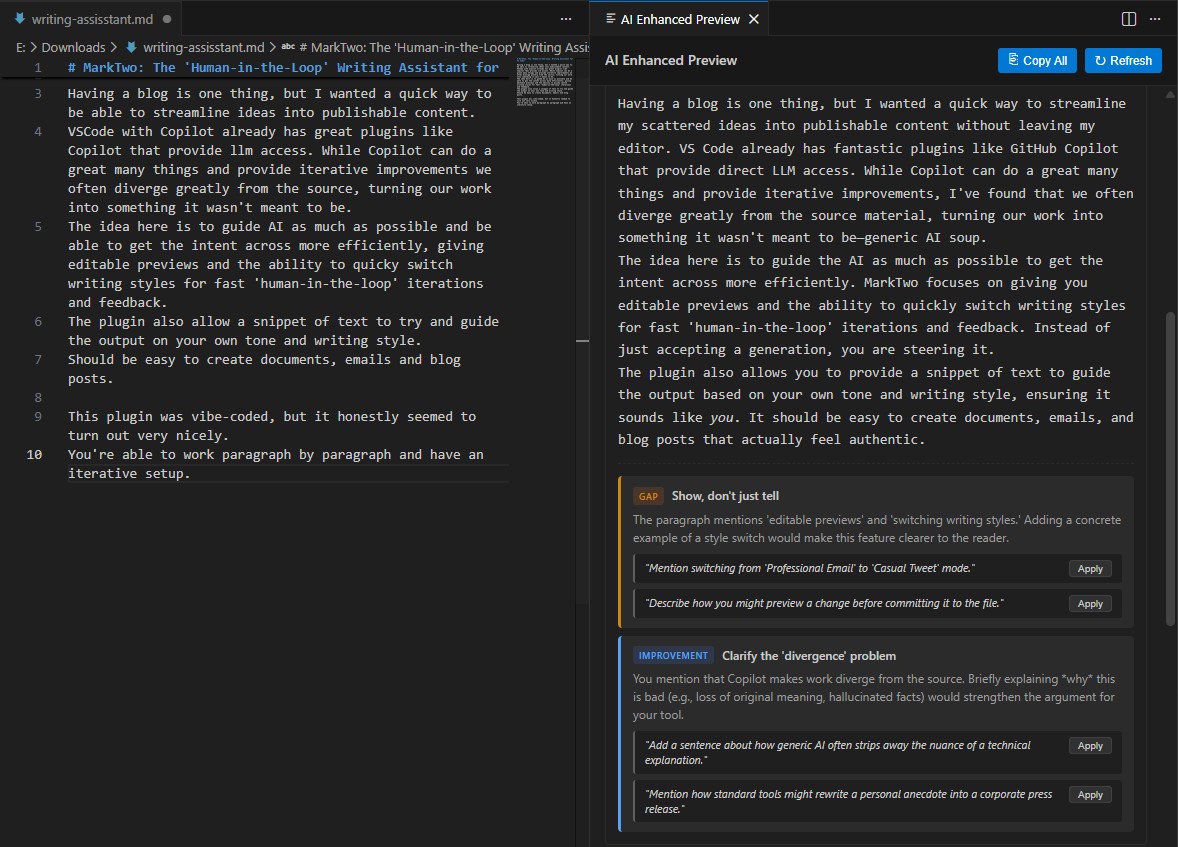
Staying in the Driver’s Seat
Section titled “Staying in the Driver’s Seat”The idea behind MarkTwo is to guide the AI as much as possible. I wanted to get my intent across more efficiently, giving me editable previews and the ability to quickly switch writing styles for fast ‘human-in-the-loop’ iterations and feedback. Instead of just accepting an AI’s rewrite, you stay in the driver’s seat.
The plugin also allows you to provide a snippet of text—like a previous article or email—to guide the output based on your own specific tone and writing style. Whether you are drafting technical documents, casual emails, or writing a blog post (like this one!), it should be easy to create content that actually sounds like you.
Built with Its Own Dogfood
Section titled “Built with Its Own Dogfood”MarkTwo was born from a simple need: iterate quickly without losing control. Instead of generating walls of text all at once, it lets you work paragraph by paragraph. This keeps context tight and style consistent, giving you a truly iterative setup where you can tweak direction as you go—rather than just accepting whatever the AI spits out.
I built it by doing exactly that: giving continuous feedback while Claude Code cranked away in the background, improving the add-in enough to produce this very post.
What’s Next?
Section titled “What’s Next?”I’m genuinely curious to keep exploring how this workflow holds up for different types of writing and situations—whether it’s technical documentation, sprawling fantasy epics, or just a quick email blast.
With further iterations and improvement, the goal is to keep writing a little more frictionless and fun. Sharing knowledge is important, but time is rarely on our side, so anything that lowers the barrier to hitting ‘publish’ is a win in my book.
Try It Out
Section titled “Try It Out”MarkTwo is open source and available on GitHub: brendankowitz/marktwo